
Measure Japanese speaking proficiency,
simply and accurately.
A CEFR-aligned Japanese speaking proficiency test — the speaking counterpart to JLPT. Results come back as fast as the same day, and candidates take it on a phone or PC in about 20 minutes.
Contact Us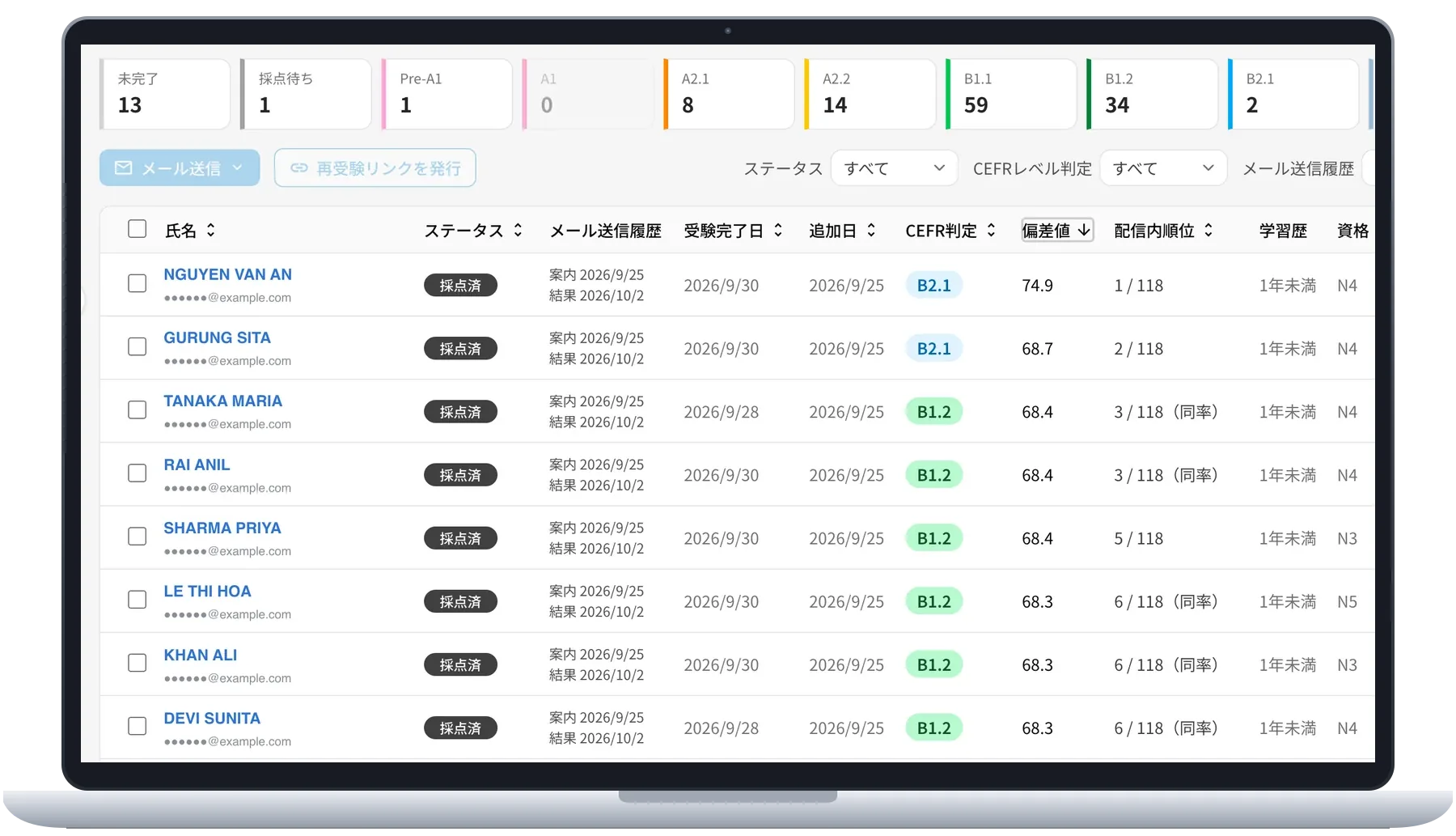
A shared yardstick for evaluating speaking
Assess speaking with CEFR levels and Can-Do statements
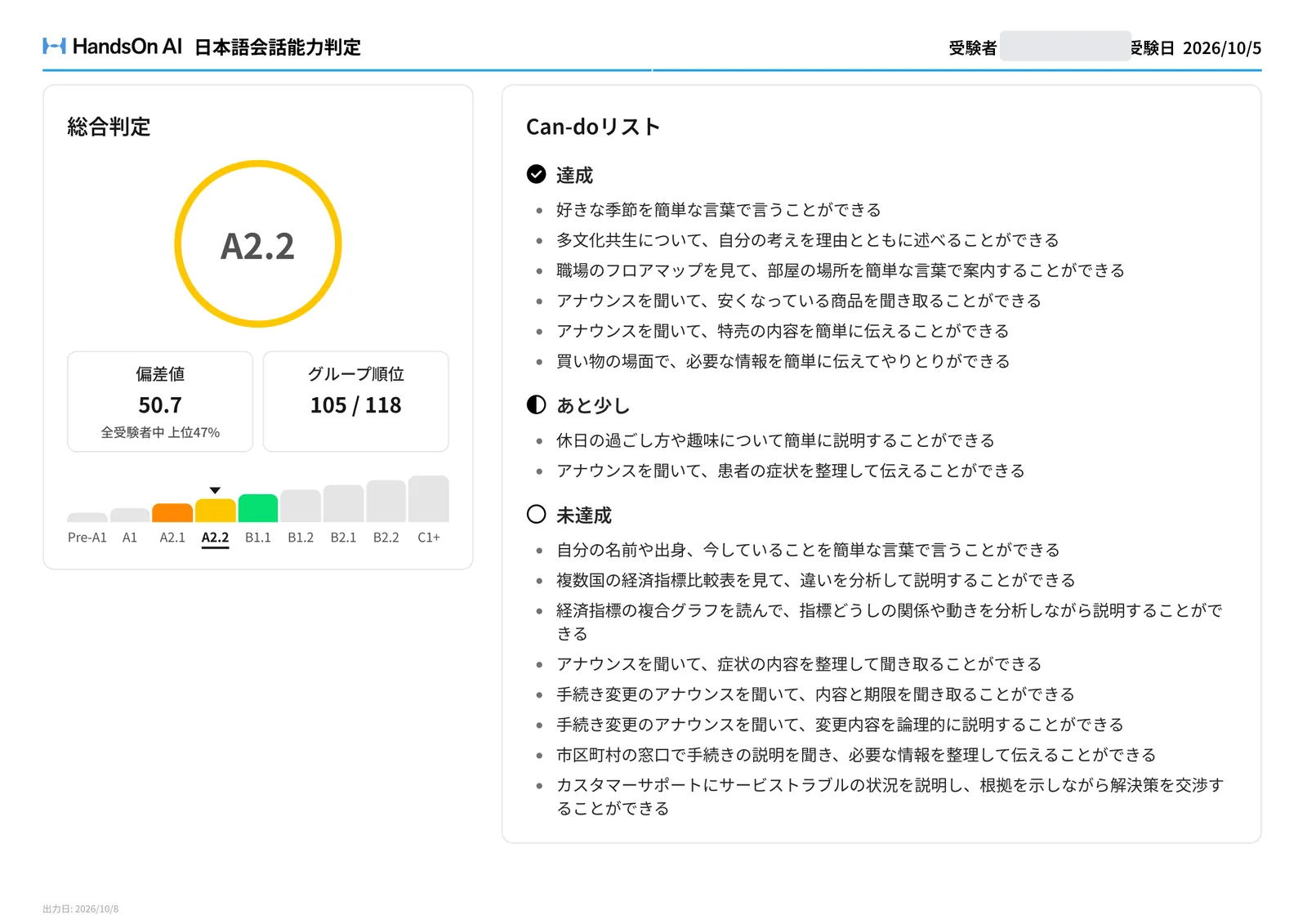
A CEFR level for speaking proficiency
An overall level from A1 to C1+, with achievement shown for each question.
Can-do statements that make ability concrete
See what the candidate can do in specific situations — such as stating a destination at a station information desk — marked Achieved, Almost or Not yet.
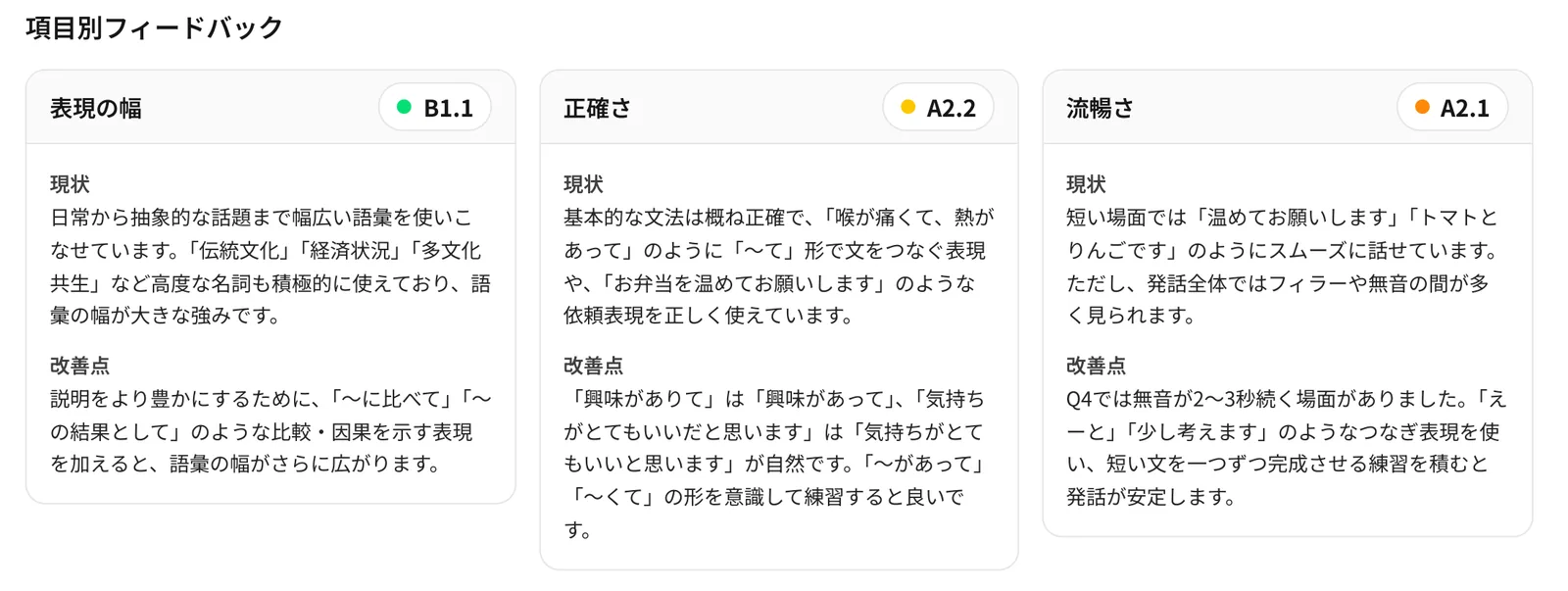
Five indicators that show what to work on
Written feedback on range, accuracy, fluency, interaction and coherence explains the current state and points to improve.
Task achievement comes first. The assessment considers both whether the candidate achieved the task and how they communicated.
T-score and rank show relative standing
Two candidates at A2.2 can still be far apart. The report pairs a T-score — the candidate’s position in the distribution of all test takers — with a rank within the same test group, giving you a basis for selection, class placement and scholarships.
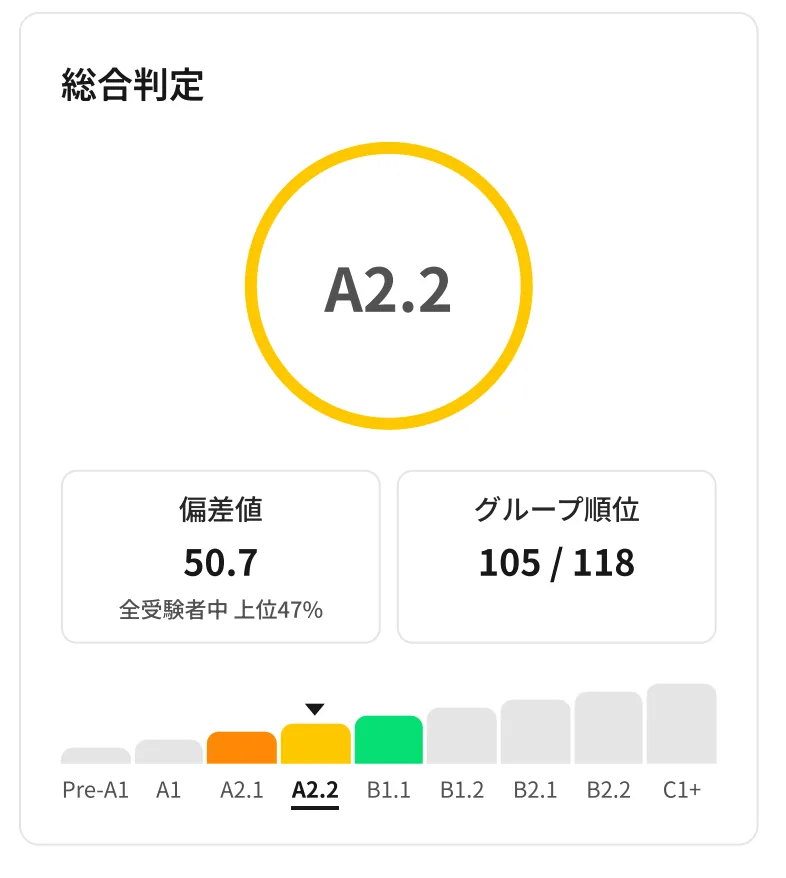
T-score
Position among all test takers
The mean is 50. It shows where a candidate sits within the same CEFR level and the top percentage they fall into, and it is comparable across classes and schools.
Group rank
Rank within the same test group
Calculated per test group — a class, a hiring round — with ties sharing a rank. Sort by it in the admin panel to pull out top performers or candidates who need follow-up.
The T-score and rank appear in both the candidate report and the admin panel.
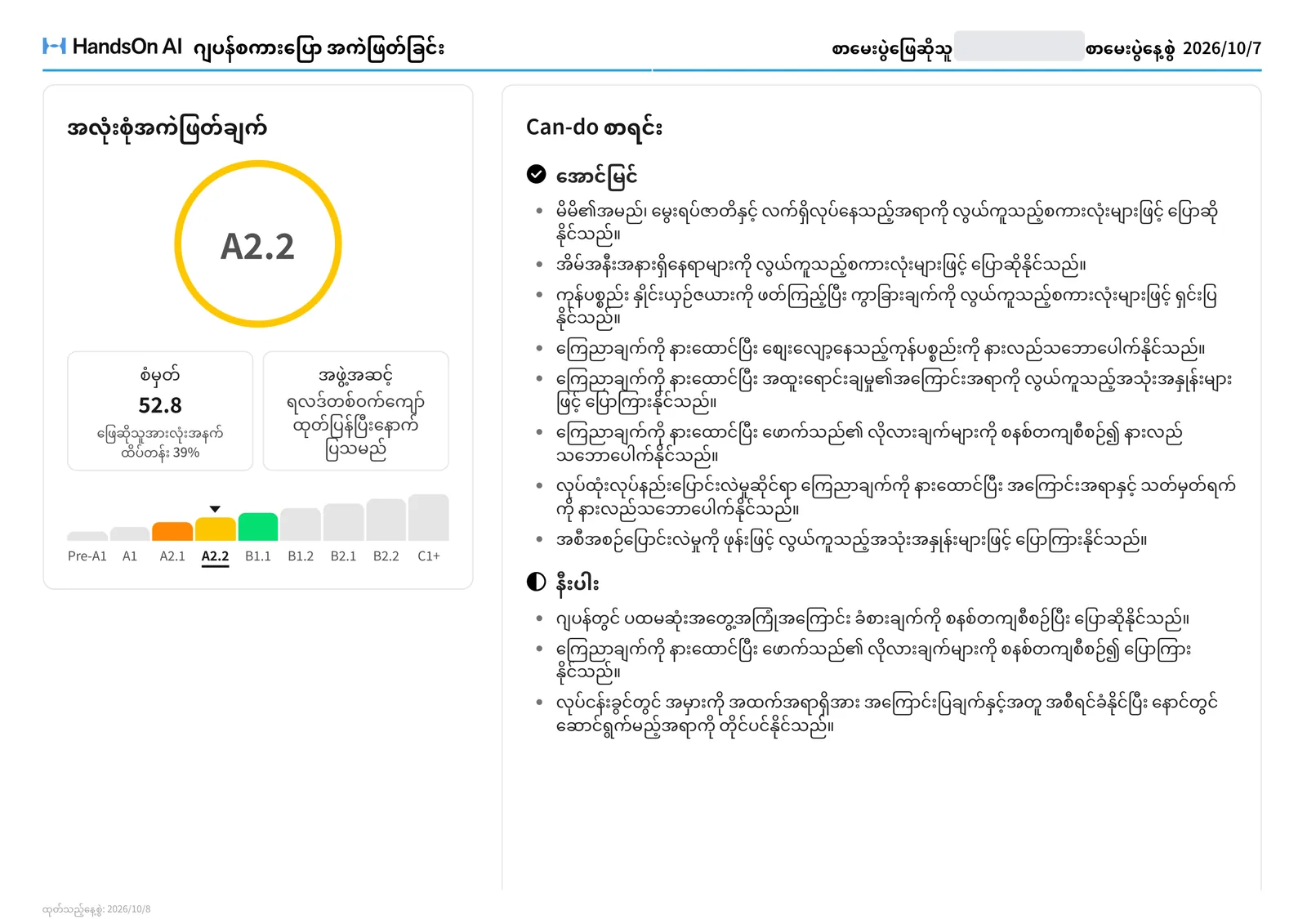
Reports translated into 20 languages
Result reports can be delivered in the test taker’s own language, including the Can-do list and the feedback on each indicator (current state and points to improve). Candidates understand their own challenges correctly, and reports are easy to share with Sending Organizations and families.
Academic supervision
Designed under the supervision of our academic advisor, for accurate CEFR and Can-do judgments.

Musashino University, Faculty of Global Studies, Department of Japanese Language Communication, Professor
Uichi KamiyoshiBackground
Graduated from Tokyo Gakugei University, Faculty of Education. Completed doctoral coursework at Osaka University, Graduate School of Language and Culture. After serving as an elementary school teacher in Kitakyushu, Senior Japanese Language Specialist and Chief Consultant at the Association for Overseas Technical Cooperation and Sustainable Partnerships (AOTS), and specially appointed lecturer at Nagasaki University of Foreign Studies, he joined Musashino University as Associate Professor in April 2016, and has held his current position since April 2023. His specialties include language education policy and community Japanese language education.
Test Structure
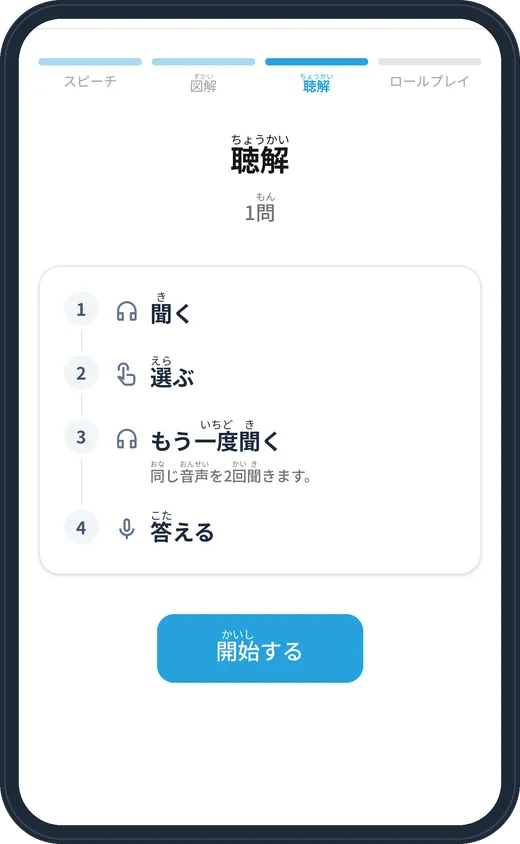
Listen, explain and respond. Four task formats assess speaking in situations close to real conversation.
PART 1
Speech
Share ideas on a given topic.
PART 2
Visual speech
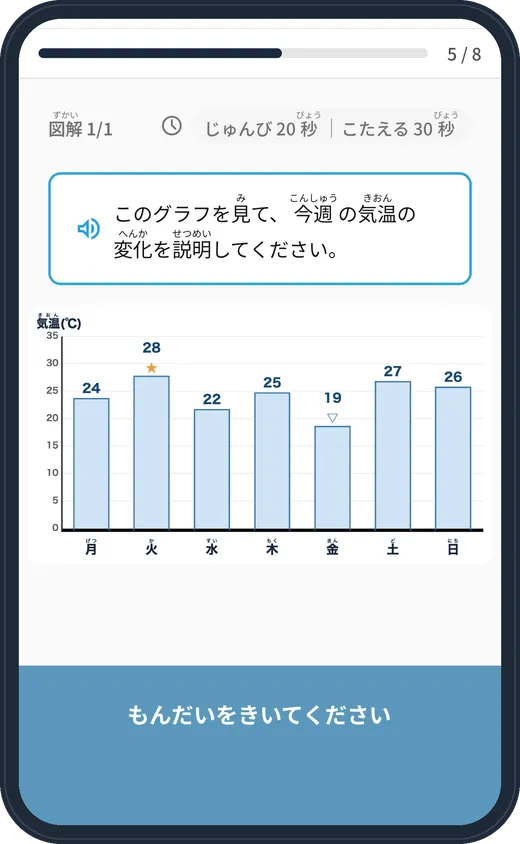
Describe the information in a graph or diagram.
PART 3
Listening & speech
Listen, answer comprehension questions, and give a short speech.
PART 4
Role-play
Respond to automated voice prompts in a given situation and role.
Review test recordings
Review recordings in the admin panel to check how candidates answered, including for entrance exams.
Use Cases
For every stage of the workforce pipeline
Japanese Language Schools


- Placement test
- Term-end test for the conversation course
- Level report at completion
Recruitment Agencies & Sending Organizations
'%3e%3cpath%20d='M24.6183%200C15.5184%200%208.82387%203.1631%205.75018%204.88489L8.54471%209.95545C8.54471%209.95545%2012.3026%207.58405%2017.7649%206.37908L11.7013%2032.0835L7.97252%2032.0712L7.97316%2032.0737C7.93823%2032.0733%207.90375%2032.0712%207.86875%2032.0712C3.52295%2032.0712%200%2035.4131%200%2039.5356C0%2043.6581%203.52295%2047%207.86875%2047C11.6508%2047%2014.8084%2044.4685%2015.5644%2041.0946L15.5674%2041.0951L16.3248%2037.853H22.6751C34.1222%2037.853%2043.0947%2031.2609%2044.4108%2018.9506C45.7269%206.64019%2035.1063%200%2024.6183%200ZM7.86875%2041.5578C6.77501%2041.5578%205.88833%2040.6524%205.88833%2039.5356C5.88833%2038.4187%206.77501%2037.5134%207.86875%2037.5134C8.9625%2037.5134%209.84918%2038.4188%209.84918%2039.5356C9.84918%2040.6524%208.9625%2041.5578%207.86875%2041.5578ZM37.9887%2018.8996C36.6144%2026.8055%2031.0613%2032.1193%2022.5399%2032.1193L17.6681%2032.1032L23.8382%205.69345C23.8439%205.69345%2023.8495%205.69319%2023.8552%205.69319C33.2601%205.69319%2039.3629%2010.9938%2037.9887%2018.8996Z'%20fill='%2300A0E6'/%3e%3cpath%20d='M55.74%2015.1274C57.4862%2014.7926%2058.6292%2013.1122%2058.2929%2011.374C57.9566%209.63583%2056.2684%208.49812%2054.5222%208.83286C52.7759%209.1676%2051.633%2010.848%2051.9693%2012.5862C52.3055%2014.3244%2053.9938%2015.4621%2055.74%2015.1274Z'%20fill='%2300A0E6'/%3e%3cpath%20d='M105.69%2028.1357C103.908%2030.7095%20101.409%2033.6684%2096.5455%2034.6465C92.1156%2035.5375%2090.5282%2032.643%2090.5282%2032.643C93.777%2031.7105%2096.9274%2030.6715%20100.046%2028.2906C103.164%2025.9098%20105.153%2022.5712%20102.98%2020.027C100.479%2017.1%2093.6214%2017.687%2089.2311%2020.5602C85.133%2023.2423%2083.223%2027.8069%2083.4968%2030.7145C83.5187%2030.9468%2083.5515%2031.1791%2083.5936%2031.4105C80.7385%2031.9198%2078.2515%2031.821%2077.0508%2030.6254C77.201%2030.4288%2077.3494%2030.2313%2077.4961%2030.0332C78.3993%2028.8931%2079.4294%2027.3288%2080.4255%2025.6858C82.6922%2022.0132%2084.0957%2019.0069%2084.0957%2019.0069H77.089C76.0147%2022.116%2070.1649%2033.8962%2067.0369%2033.8962C64.5297%2033.8962%2066.0563%2029.2327%2066.6471%2027.1766C67.2957%2024.9191%2069.706%2019.0069%2069.706%2019.0069H63.5014C63.5014%2019.0069%2060.9261%2026.6229%2060.562%2030.595C60.5469%2030.7595%2060.5348%2030.9237%2060.5241%2031.0876C58.893%2032.1243%2055.1481%2034.3293%2052.7966%2034.3293C50.8112%2034.3293%2051.4012%2031.9879%2052.0599%2030.0396C52.7185%2028.0912%2056.321%2019.0069%2056.321%2019.0069H50.3624L45.7832%2030.9862C44.8689%2033.5719%2044.0052%2038.7489%2049.7387%2038.7489C53.8193%2038.7489%2058.6994%2035.9614%2060.7392%2034.6717C61.2345%2036.894%2062.5181%2038.5553%2065.0732%2038.741C67.458%2038.9143%2069.4385%2037.9878%2071.0685%2036.7375C72.3657%2035.8074%2073.6213%2034.6309%2074.8078%2033.327C77.3701%2035.5183%2080.9657%2035.3783%2084.7837%2034.434C86.2882%2036.7992%2089.0641%2038.6147%2093.0515%2038.7619C98.9818%2038.9807%20104.185%2036.5133%20108%2030.5621L105.69%2028.1357ZM89.3959%2029.7471C88.4497%2027.6879%2089.6641%2023.975%2092.6851%2022.4822C95.47%2021.1061%2097.8438%2021.8452%2098.5339%2022.7318C99.2632%2023.669%2098.5638%2024.5265%2097.5952%2025.3598C96.4743%2026.3241%2094.9893%2027.2248%2093.5114%2027.9796C93.4427%2028.0145%2093.373%2028.0494%2093.3032%2028.0842C93.257%2028.1074%2093.211%2028.13%2093.1649%2028.1529C92.5464%2028.4583%2091.8899%2028.7595%2091.2086%2029.0497C90.5412%2029.3308%2089.9217%2029.5672%2089.3959%2029.7471Z'%20fill='%2300A0E6'/%3e%3c/g%3e%3cdefs%3e%3cclipPath%20id='clip0_701_1760'%3e%3crect%20width='108'%20height='47'%20fill='white'/%3e%3c/clipPath%3e%3c/defs%3e%3c/svg%3e)

- Candidate screening
- Proof of level before and after placement
Training Companies & Hiring Companies
%20--%3e%3cdefs%3e%3cstyle%3e%20.st0%20{%20fill:%20%23c90977;%20}%20.st1%20{%20fill:%20%23231815;%20}%20%3c/style%3e%3c/defs%3e%3cpath%20class='st1'%20d='M23.78,9.91l4.21,4.83h3.07l-4.55-5.12.24-.05c3.12-.63,3.58-3.06,3.58-4.45,0-3.21-2.65-4.69-5.12-4.7-1.16,0-2.32,0-3.47-.01-1.11,0-2.22,0-3.33-.01v14.35h2.47v-4.88h2.86l.04.05ZM20.88,2.7h4.34c1.83,0,2.64,1.24,2.64,2.48,0,1.71-1.33,2.48-2.64,2.48h-4.34V2.7Z'/%3e%3cpath%20class='st1'%20d='M136.93,14.74h3.07l-4.55-5.12.24-.05c3.11-.63,3.58-3.06,3.58-4.45,0-3.21-2.65-4.69-5.12-4.7-1.16,0-2.31,0-3.47-.01-1.11,0-2.22,0-3.33-.01v14.35h2.47v-4.88h2.86l4.26,4.88ZM129.82,2.7h4.34c1.83,0,2.64,1.24,2.64,2.48,0,1.71-1.33,2.48-2.64,2.48h-4.34V2.7Z'/%3e%3cpath%20class='st1'%20d='M45.41,14.81c2.39.69,4.86.26,6.79-1.19,1.93-1.45,3.04-3.66,3.04-6.06,0-.31-.02-.62-.07-.99h-5.88v2.44h3.29l-.07.19c-.37,1.01-.97,1.89-2.7,2.92-.57.34-1.2.54-1.82.58-1.72.1-3.37-.66-4.41-2.04-1.32-1.74-1.38-4.07-.16-6.09.3-.51.73-.93,1.23-1.24,2.51-1.54,5.43-1.07,7.11,1.14.3-.11,1.98-.73,2.36-.87-1.39-2.25-3.79-3.6-6.43-3.6-.8,0-1.61.12-2.4.37-2.3.71-4.16,2.59-4.84,4.91-.98,3.35.25,6.76,3.15,8.69.56.37,1.18.66,1.83.85Z'/%3e%3cpath%20class='st1'%20d='M6.58,15.08c2.36.3,4.67-.49,6.34-2.16,1.67-1.67,2.46-3.98,2.16-6.34C14.65,3.23,11.91.49,8.56.06c-.33-.04-.66-.06-.98-.06-2.01,0-3.92.78-5.35,2.22C.55,3.89-.24,6.2.06,8.56c.43,3.35,3.17,6.09,6.52,6.52ZM2.51,6.7c.35-2.12,2.07-3.84,4.19-4.19,1.67-.28,3.31.24,4.5,1.43,1.19,1.19,1.71,2.83,1.43,4.5-.35,2.12-2.08,3.84-4.19,4.19-.29.05-.59.07-.88.07-1.36,0-2.65-.53-3.62-1.51-1.19-1.19-1.71-2.83-1.43-4.5Z'/%3e%3cpath%20class='st1'%20d='M115.49,15.08c2.35.3,4.67-.49,6.34-2.16,1.67-1.67,2.46-3.98,2.16-6.34-.43-3.35-3.17-6.09-6.52-6.52-.33-.04-.66-.06-.98-.06-2.01,0-3.92.78-5.35,2.22-1.67,1.67-2.46,3.98-2.16,6.34.43,3.35,3.17,6.09,6.52,6.52ZM111.42,6.7c.35-2.12,2.07-3.84,4.19-4.19,1.67-.28,3.31.24,4.5,1.43,1.19,1.19,1.71,2.83,1.43,4.5-.35,2.12-2.07,3.84-4.19,4.19-.29.05-.59.07-.88.07-1.36,0-2.65-.53-3.62-1.51-1.19-1.19-1.71-2.83-1.43-4.5Z'/%3e%3crect%20class='st1'%20x='34.25'%20y='.4'%20width='2.47'%20height='14.35'/%3e%3cpolygon%20class='st1'%20points='100.08%2014.74%20102.55%2014.74%20102.55%202.87%20107.62%202.87%20107.62%20.4%2095.01%20.4%2095.01%202.87%20100.08%202.87%20100.08%2014.74'/%3e%3crect%20class='st1'%20x='58.61'%20y='.4'%20width='2.47'%20height='14.35'/%3e%3cpath%20class='st0'%20d='M84.03,12.8h7.51l1.03,1.95h2.82L87.79.31l-7.61,14.43h2.83l1.03-1.95ZM85.26,10.46l2.53-4.79,2.53,4.82v.07h-.07s-4.97,0-4.97,0l-.04-.06.02-.04Z'/%3e%3cpolygon%20class='st1'%20points='77.99%2014.74%2077.99%20.4%2075.52%20.4%2075.52%2010.73%2067.88%20.4%2065.34%20.4%2065.34%2014.74%2067.81%2014.74%2067.81%204.41%2075.45%2014.74%2077.99%2014.74'/%3e%3c/svg%3e)
- Quantitative measurement before and after training
- Setting the right training goals
Rank, T-score and test history,
in one admin panel
Distribute tests, track completion and manage results in one place. No collecting papers, scoring or transcribing — results accumulate as test history automatically.
Distribute tests and send reminders
Choose a difficulty and issue test URLs. Invitation emails and re-test links are sent from the admin panel too
Completion status and level distribution
See at a glance who hasn’t finished, who is awaiting scoring, and how many candidates sit at each level — by school or class
Group rank, T-score and CEFR level in one list
Sort and filter to pull out top performers or candidates who need follow-up
Test history and progress
Line up a candidate’s past tests and see how far they have come since the first one
Detect signs of misconduct,
keep assessments fair
The system detects signs of misconduct in online testing to help keep assessments fair. It records when a candidate switches to another screen during the test, and for tests that record the candidate’s face it also detects signs in the video. Detections are shown in the admin panel to help you review results.
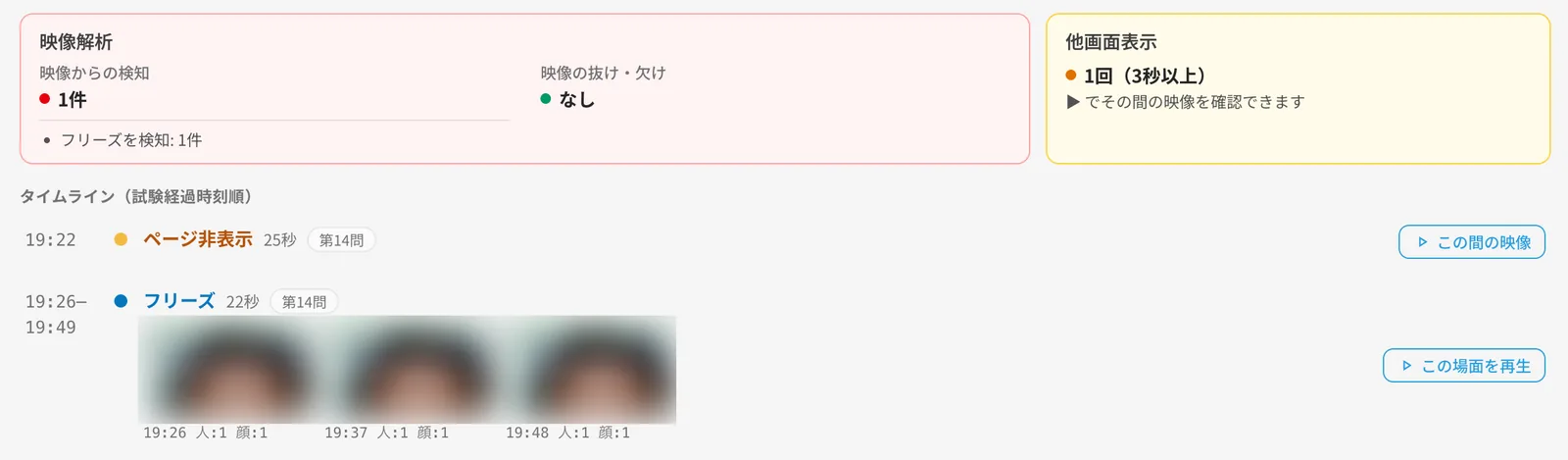
Switching screens
Records when the candidate switches to another tab or window during the test
Multiple people in frame
Detects signs that someone other than the candidate appears in the video
Face not visible
Detects periods when no face can be confirmed in the video
Video stopped or blocked
Detects signs that the camera stopped or was covered
Automated detection is reference information for review. A detection alone does not establish misconduct.
Ready to use for grading
and level reporting
Unlike reading or grammar, speaking has never had a shared yardstick. Grades based on teacher impressions drift, and interview-style tests are a heavy burden at the end of every term.
Because the test returns CEFR-aligned levels and Can-do statements, it can be used as it is for grading a conversation course or reporting levels at completion — in line with Japan’s Reference Framework for Japanese Language Education.
As the term-end test for a conversation course
Everyone takes it at the end of term; task achievement and the five indicators back up the grade
For CEFR-aligned level reporting
CEFR levels and Can-do statements leave a record based on language activities
For calibrating between teachers
A shared yardstick makes discussions about scoring differences concrete
Measure, develop,
and confirm growth
Don’t stop at a single test: measure, practice, then measure again. Re-assessment uses the same criteria, so growth is recorded exactly as it happened.
Measure speaking ability
Japanese Speaking Assessment (1st time)
Practice
Repeated practice with AI Role-Play — a place to practice for candidates below the target level
Confirm the change
Japanese Speaking Assessment (2nd time)
AI Japanese Learning (AI Role-Play and Mini Tests) in step 2 also works as an achievement test for the situations and sentence patterns covered in class.
Frequently asked questions
Q.When are results available?
Q.What do candidates need?
Q.How is it different from JLPT?
Q.What is the difference between a proficiency test and an achievement test?
Q.Can it be used to grade a conversation course?
Q.Is it aligned with the CEFR and Japan’s reference framework?
Q.Can it handle groups with mixed levels?
Q.Is the AI scoring reliable?
Q.Can you confirm that the candidate took the test themselves?
Q.How is the T-score calculated?
Q.Do candidates get the report in their own language?
Q.How is it priced?
Let us help you find the best solution
Whether you need a consultation, a quote, or a demo —
feel free to reach out.